










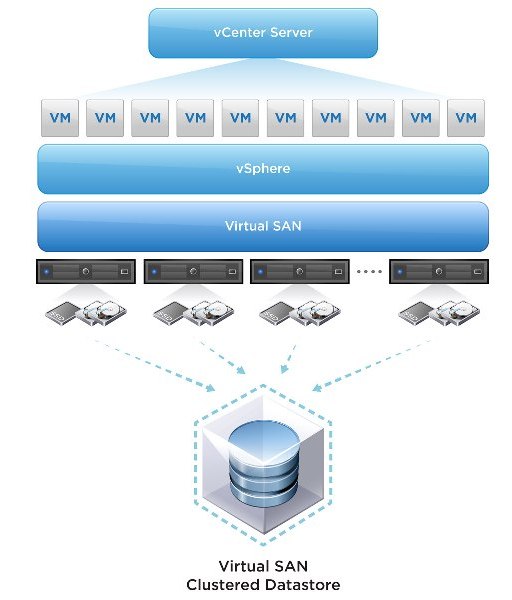
VMware Virtual SAN or we call it vSAN which was introduced back in 2013. In simple word if I would say, vSAN is a software based distributed storage solution that pools together direct-attached storage devices across a VMware vSphere cluster to create a distributed, shared data store. You can also refer to it as hyper-converged, or can consider it as software defined storage and some even referred to is as hypervisor converged at some point. VMware vSAN is fully integrated with VMware vSphere. There is very simple configuration which required for cnfiguring vSAN. If you know how to enable HA and DRS, then you know how to configure vSAN. Of course you will need to have a vSAN Network, and you achieve this by creating a VMkernel interface and enabling vSAN on it. vSAN works with L2 and L3 networks, and as of vSAN 6.6 no longer requires multicast to be enabled on the network. If I will go through with a quick overview of vSAN, here it is.
Overview of VSAN:-
Requirements for VSAN:-
Types of VSAN Configuration
Hybrid:
It uses both SSD and magnetic hard disks.
VSAN requires at least one flash-based device in
each host.
Hybrid VSANs use the SSD as a read and write cache just as some external SANs do.
W hen blocks are written to the underlying datastore, they are written to the SSDs first, and later the data can be relocated to the (spinning) HDDs.
VSAN’s read/write cache ratio is 70 percent read, 30 percent write.
All SSD:
It uses all SSD Disks.
There are many reason why customers are more intersted in choosing VSAN for their SDDC environment. Here are few of them:




VMware Insight


